2 The Search for Options
 When looking for content to use, you can hit a copyright wall.
It’s probably safe to say we are all thieves. Not “real” thieves, like in the movies, but can you honestly say that you have never just “used” an image you downloaded from the internet, without looking for, let alone adding attribution? Maybe you are a thief with a heart of gold, and even added the source of the image or content, thinking “hey, this is better than nothing!” And that’s true. It is better than nothing, however in the land of best, professional practices, this is still not enough.
If you have ever gone to the internet and done a Google search for a specific image that illustrates a concept or detail you are covering in your class, you have likely found something that works. That is because your search is covering everything Google images can find. Most of those images however, are copyright protected, and NOT FREE to use. But do not despair, but don’t get too hopeful either. There is a way to look for useable, licensed images that exists with just a few clicks of your mouse (or trackpad).
The biggest challenge here is that the more specific your search, the more challenging it becomes to find the right image. Enter “dog” into a search, and you will get 1000000000000s of image hits. Enter “dog driving a car” you will get far fewer hits. This makes sense. But beyond just as being specific in your search narrows your results, so too does looking at the licensing and attribution of the search results. Especially now if you add no a.i to the search.
The Classic, “Dog Driving a Car” Experiment
Take the example above. If you search “dog driving a car no ai” you will still get pages of results. Most are not what you are looking for, but maybe there are some you like, but how do you even know which ones are licensed for use?
The easiest way is to locate the Tools option just below the search bar in Google. It will come after All, Images etc…
Select that and from the dropdown, select Usage Rights.
Next, navigate to the option Creative Commons licenses. And there you go. The images you see now all have some form of Creative Commons license attached or attribution requirement for use. But what do you notice? You will see that the 10000000s of possible images has been reduced to 1 page (approximately 41 images). That is because those are the only images (Google can find) that have explicit licenses attached. So the image you liked from your first search might not be included. And how do you verify the licensing of the remaining images?
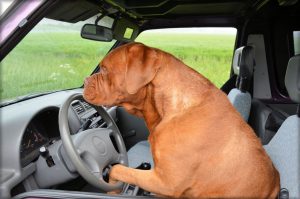
In this experiment, I selected this image (it was the 3rd image for me in the results).
 .
.
When you select an image, it opens the details, then navigate to License details. This is where you can find out the terms of use, and the type of license. In this particular case the license is set as CC0 1.0 Universal and state: The person who associated a work with this deed has dedicated the work to the public domain by waiving all of his or her rights to the work worldwide under copyright law, including all related and neighboring rights, to the extent allowed by law.
This is awesome! You could use this image freely! But it can be frustrating if this isn’t even really the image you wanted.
Why Make OERs? You Remain the Author.
Now imagine a world where images and content were shared freely. The mistake many people make is that they think when they set a Creative Commons license they are giving away copyright…or ownership. This is not the case. All you are doing is making the content available to use, based on conditions. For 99.9% of the content we make, we are never going to make any money. So why not make the content available? If everyone who took a photo of a “spaniel in a car” had made their image licensable, we would have been able to find that perfect image to help our students learn about the amazing ability of dogs to operate automobiles!!! What a lost opportunity.
Being a creator and author of OERs is a chance to help build the global catalog of resource content, to provide other instructors and learners with material that could be valuable. That comparative chart on different types of wood grains, that medical diagram on intravenous procedures, that video tutorial on piano notation….all of these could be licensed and shared. And you would always remain the author!
Media Attributions
- why make oer
- dog-drive-1