4.1 Phase 1 Students
The results of the co-design sessions provided valuable insight into the student experience. By working with students to analyze their experiences using assistive technology, common thematic elements reveal numerous issues facing disabled students in post-secondary education. Data from the student sessions was coded and sorted into four themes: Formats, Student Experience, Time, and Solutions.
4.1.1 Formats
All co-designers mentioned digital file formats that do and do not work well for them and their assistive technology. The chosen file formats used in a course has a significant impact on learners. One Langara student explained:
“You’re really playing Russian roulette with what you’re getting and sometimes you have to drop the course on the first day ’cause you see what format they’re using.”
– Stella Grynspan
The lack of information about what to expect means learners may find their experience inconsistent, disjointed, or impossible to manage.
Langara student Stella Grynspan indicated that they have “taken multiple courses where I couldn’t even do the course because they had many inaccessible sources.” An unnamed former Langara and current UBC student noted that inaccessible content in a class was such a barrier that:
“I dropped that course! I couldn’t pass it! I dropped the course, and it changed my education trajectory.”
The Canadian Human Rights Commission (2017) found that 20% of Canadian students with disabilities altered their academic path due to their disability. A 2022 article found that inaccessible content “can halt academic progress for students who rely on assistive technology” (Lomellini et al., p. 2).
Co-designers expressed that inaccessible content is a direct barrier to success. Langara student Lila McKinlay noted that while some courses have “been excellent, the majority’s been really tough, and some have been really, really . . . hindering my ability to participate.” Stella noted that inaccessible content has “been prohibitive in taking multiple classes at Langara [and] really prohibitive to my education.”
As discussed in previous sections, some file formats are more accessible than others. While each learner is different, there are formats that generally work better with assistive technology. Former Langara and current SFU student Soma Ali, who uses screen reader software for all digital content, noted a preference for Word documents. When asked about an ideal format, Soma said:
“I ask that they produce it in a Word format. A rich text or something other than PDF, as JAWS [screen reader software] and PDFs I find are not the most compatible with one another . . . I wish [instructors] would be more willing to convert things . . . out of PDF.”
– Soma Ali
When asked ‘what does JAWS do with an inaccessible PDF?’, Soma replied:
“It would say to me, blank document.”
Here Soma explained a common occurrence with inaccessible PDFs. As PDFs inherently lack accessible structure, an inaccessible PDF is essentially an image and screen reader software cannot convey the content to the user.
Lila McKinlay noted content types that don’t work for any learner:
“I’ve had so many times where it’s just a scan of an article, a scan of . . . you know, 3 pages of a book or something, and it’s freaking even sideways, and it’s just so fucking annoying, and so that’s where I’ve had to go find my own technologies.”
However, Lila acknowledged progress over time and some positive experiences:
“They made sure that there was no textbooks that had to be purchased. They were making sure that they had . . . yeah, basically that all their stuff was… as accessible in the broad term of that . . . it was all, um . . . digitally created, no scans.”
The small distinction Lila notes between digital content that was more accessible and poor-quality scans of content may not be significant to readers who do not rely on assistive technology or have near-perfect eyesight.
Stella stressed the importance of instructors making deliberate and intentional choices with their learning materials, imploring: “please realize if you’re using a textbook, make sure it’s accessible . . . because [disabled students are] not only just . . . reading the textbook, they’re also converting it into an accessible format for them and a format that they can learn.” Fichten et al. (2020) found that proprietary text-to-speech technology included in some electronic textbooks and general incompatibility with assistive technology were significant factors making many digital books inaccessible.
Regarding textbooks, both Stella and Matt McLeod (a former Langara and current UBC student), indicated their frustration with courses that over-rely on publisher platforms. Matt was critical of instructors stating they “are being lazy because they’re getting, they’re getting a PDF full of . . . lecture slides, notes, talking points, keywords, and an exam bank. So, they have to do shit.” Matt was incredibly gracious in his next sentence, asking, “Is that really their fault? The instructor? No, because they’re in a world where they’re not paid enough to do what they’re doing. They’re exploited… most of them.” Stella, when asked who is most responsible for inaccessible content, stated:
“I would say it’s the teachers. I don’t want to blame them because they’re underpaid and they’re overworked.
However, Stella noted a simple compromise to ensure students get access to essential information: “if [instructor] could just . . . put everything in the most simple . . . it doesn’t have to be super ’cause it has to be a Word document with everything that’s going to be on the test.” Henry Swan’s 2025 guide to inclusive design suggests good design will “prioritise content” so that “people can accomplish tasks in a way that suits their needs without undermining the quality of the content”.
While only speaking for herself, Stella wanted to remind instructors to focus on what really matters, access:
“You can call me whatever you want . . . you can say whatever you want to me as long as you actually make an effort to give the accessible format and you don’t have to be perfect.”
– Stella Grynspan
4.1.1.1 Activity
Four of five co-designers were asked about file formats they:
- Can’t use
- Don’t like or have difficulty using
- Like and use
By combining the responses, patterns of what formats do not work for disabled students were revealed. As we move to the last question, responses reveal what file formats worked for all co-designers. This pattern follows the inclusive design principle of solving for one and extending to many (Holmes, 2018).
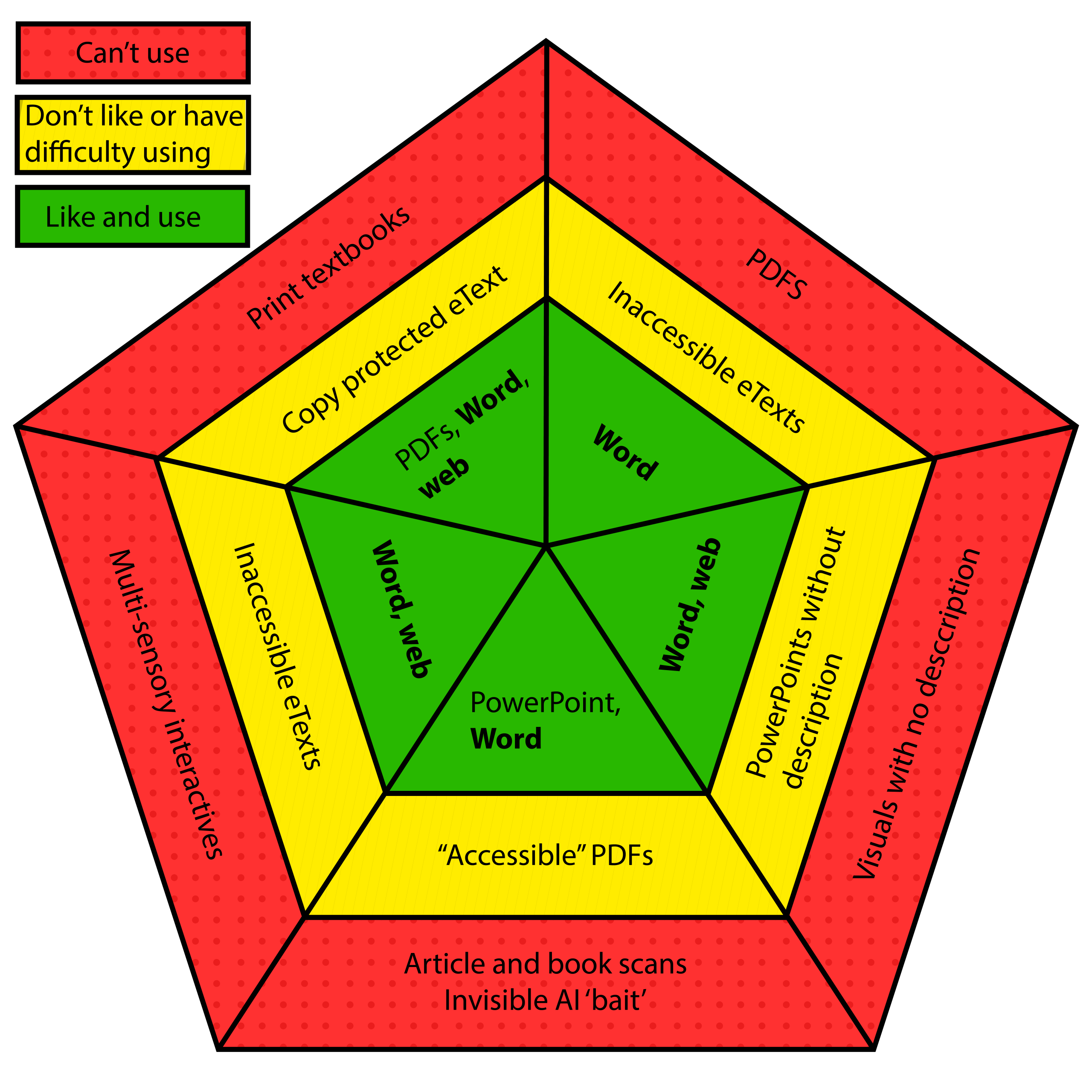
| Student | Can’t use | Don’t like or have difficulty using | Like and use |
|---|---|---|---|
| Former Langara and current UBC student | Print textbooks | Copy protected eTextbooks; Publisher platforms that don’t work with assistive technology | PDFs, even if they aren’t perfect; Pirated content; Word and web content |
| Former Langara and current SFU student | PDFs (must be sent for remediation); Sometimes read some text but often nonsense and out order, worst case is ‘blank document’ | Many eTextbooks don’t work well with needed software | Word (works with JAWS) for reading, writing, and formatting |
| Former Langara and current SFU student | Videos without transcripts; slides without description | PowerPoints without visual description; content with poor/non-existent image descriptions | Word and web content for text heavy; PDF ok when created properly; Prefers plain text documents with essential information. |
| Langara student | Article and book scans; Invisible bait text (to ‘catch’ AI use) | “Accessible” PDFs to split into digestible pieces (too large crashes software) | PowerPoint, Word documents, plain text |
| Langara student | Multi-sensory interactives that are incompatible with assistive technology | Inaccessible eTextbooks | Word, web content with essential information in text. |
Based on this exercise, Word documents were liked and used by all co-designers. Web content was mentioned by 3 out 5 as a format they like and can use. All students used at least one of those formats. While one student indicated they liked PDFs, this was as opposed to DRM locked publisher platforms.
4.1.2 Time
All students mentioned time, specifically how much time is required for schoolwork and related tasks. Each student mentioned the impact of inaccessible content as a significant burden that requires additional time to work around. When asked how long it takes to find content in formats that work with his assistive technology, Matt stated:
“Maybe 10 minutes now, right? And just in contrast to 15 seconds if it were in a format that were accessible.”
Soma, who uses a screen reader, noted that readings take her significantly longer than other students: “a sighted student could take maybe one or two hours. I take up to four to five hours to do one assignment or read a chapter.” That is if the content is accessible. If content needs to be remediated, Soma must wait even longer. Having to wait for access puts disabled students at a disadvantage.
Students noted how time spent finding accessible content or converting inaccessible content ate into the time needed to do the actual work. A former Langara and current UBC student emphasized this point, revealing that “the time and stress involved with accessing and using the technological aspects of the courses was actually very huge. It was . . . almost 50-50.” This student is not alone in their feelings; McGregor et al.’s 2016 study found that disabled students faced significant obstacles caused by non-academic responsibilities. Stella also noted how having to create her own accessible versions of content cost her an incredible amount of time.
“It took me two hours for something that it would take a student without accessibility needs 15 minutes because I had to relisten to my teachers saying it over and over again so I could draw it out and put into an accessible format. And then I had to figure out how I put that into an accessible format.”
– Stella Grynspan
Students often framed their experience relative to their peers.
“[Another student], it takes 2 hours. Okay, you’re someone with a disability, it already will maybe take you a bit longer just because of that, and then you’re having to add on another hour or two just to try to access it.”
– Lila McKinlay
When asked “Do you think people know [how long things take]?”, Matt replied:
“No, no one. No one has a clue.”
Choosing and creating inaccessible learning material places unfair burdens of additional time, stress, and labour on students. On top of life, school, and other demands students have on their time, inaccessible content forces disabled students to commit extra hours every week to finding or converting material. Or they may just end up being excluded.
Several students noted the time needed to develop their own methods to effectively operate in an inaccessible system.
“So I’m literally, like, it’s hours upon hours of trying to, like, learn how to . . . use workarounds, background, blah blah blah. And so it’s like, oh, maybe the next semester it’ll be a little bit better, because I’ve learned that, but then there’s inevitably kind of another issue.”
– Lila McKinlay
“Two years at Langara before I figured this out . . . it took me two years of . . . banging my head and . . . ended up not accessing the content at all and just figuring it out through other ways of how I’ve navigated the entire world.”
– Matt McLeod
However, Matt also noted the positive outcome of that process:
“If I had not had this learning process here of like developing the competency and the mechanisms of like how to just like get my needs met and do it all for a couple years, UBC would not have been approachable.”
Ultimately, all the extra time needed to consume inaccessible content means students have less time and energy for learning.
“I spent a lot of hours in a lot of stress. All that time could have actually been used absorbing the knowledge and feeling confident.”
– Former Langara and current UBC student
The additional time required of disabled students is a significant cost. The over reliance on accommodations instead of proactive accessibility also places significant strain on administrators, remediators, and instructors.
4.1.3 Student Experience
Co-designers all noted different factors that hindered their learning. Understanding the student experience, as it relates to inaccessible digital learning material and to their general experience in school, is key to understanding how to undo practices that negatively impact students and to create more welcoming and inclusive environments. Co-designers expressed varied emotional responses when asked about their experiences. Matt indicated that in his opinion, barriers experienced by students with disabilities, especially ‘invisible’ disabilities, can be difficult for others to understand.
“They did not take me seriously until I literally sat down [redacted] and showed them what I needed and how I accessed the world.”
– Matt McLeod
Matt’s sentiment aligns with other studies of academic ableism, as discussed in section 2.1.3, particularly Sheets’ (2019) study that found instructors grappling to understand why they should accommodate “someone who appeared young and healthy” (p. 80).
Soma noted the negative repercussions of inaccessible content and how it significantly impacts her ability to demonstrate what she has learned and succeed:
“I just got an e-mail from [school] saying, hey, your GPA is below 2.00. If you don’t get your GPA back up for the fall term, you’re gonna be on academic probation for a year. And I’m just sitting there going ‘not again.’ This is like the second time this has happened, right? It’s not really my fault. The material was just not accessible.”
– Soma Ali
Matt echoed this sentiment, stating that the consequence of encountering inaccessible content is “immense . . . I will misunderstand deadlines or not fully understand something.” Co-designers often expressed powerful emotions when asked how they felt when they encounter inaccessible content. Lila McKinlay, when reflecting on a specific instance when an instructor “invented a barrier”, stated that the instructor’s actions caused her “so much self-doubt” forcing Lila to ask herself “What did I do wrong? What did I miss? How did I fuck that up? What did I, you know, where did I . . . It was so gross . . . being, like ‘am I going crazy?’” Matt expressed that he felt he was “holding emotional space for institutions” while the “fatigue over the many, many, many different . . . microaggressions that that person experiences” took a significant toll on his mental wellbeing. When asked about how they feel when excluded, one student responded:
“It’s infuriating . . . your blood pressure goes up.“
– Former Langara and current UBC student
Soma expressed that “it was really upsetting and frustrating” when they couldn’t access content. Matt indicated that “it was all exceptionally overwhelming because I didn’t understand how I was gonna access this content, and so having that added barrier . . . adds a ton of emotional labour and work to just the process of school.”
Several students noted the lack of technical support and the technical barriers that often felt needless.
“Where is every . . . where is all the people to support or interact with?”
– Former Langara and current UBC student
This student went on to express frustration with unfulfilled promises, stating recruitment information is “lying. I feel like what happens is it’s all lies . . . it’s like . . . ‘Come to Langara! We’re supporting you! We have all these things, da-da-da-da!’ But . . . but then . . . nobody there to actually . . . connect with and help you do that, and the only reason I connected with you is because I was in the accessibility department.” This student also lamented the technical skills required by all students to simply complete and submit assignments, stating:
“These hoops that we’re talking about, they’re actually part of the course, because if you can’t do it you can’t actually complete the course.“
– Former Langara and current UBC student
Some students have developed a patchwork of tools to get the access they need.
“A lot is really had to be self-taught . . . educating myself, googling everything, Reddit, how do you do it, figure it out, and so then I have that for the next time . . . and more often than not, I spend time just trying to figure workarounds or get it to work, and it inevitably doesn’t really.”
– Lila McKinlay
Matt recounted an experience when familiar technology was swapped for one he had not previously used in an exam setting: “[familiarity] is so important when you think about cognitive load when writing an exam. What do I need to be attending to when I write that exam? It’s not calibrating. Try again. It’s writing the exam.”
As Soma expressed above, when learning material isn’t accessible, students are unable to fully demonstrate their learning and succeed. Matt, reflective that other disabled students have had harder times than he has, referred to “tragedies. They are what people think about when they think about someone that dropped out of university because like I know people here that couldn’t access the institution the way that . . . the institution need[ed] to be negotiated and they just they just drop out.” When someone is unable to conform to post-secondary’s preconceived notion of what is acceptable, they are not welcome. Matt also expressed the emotional drain of constant barriers and how that left him with less energy to complete his schoolwork:
“I was so upset with this process of continually not feeling I can get the content in the way I needed it . . . It’s more emotion, it’s more cognitively. You . . . you’re demanding more effort just to get to what I’m supposed to be accessing and which is taking away from the amount of cognitive energy and effortful attention I have to just do the work itself. In and of itself that right there is more cumbersome and demanding than if it was accessible in a way that made sense.”
– Matt McLeod
When content is inaccessible and disabled students are asked to do more work, they feel excluded and unwelcome. For one student, inaccessible content significantly undermined her confidence and academic success:
“I wasn’t able to access as much . . . information. And confidence, as I feel like I am capable of.
– Former Langara and current UBC student
4.1.4 Solutions
People often know what they need to succeed; they are experts on their own lived experience. All students offered suggestions and solutions that would help improve their experience. Matt expressed that being asked what would help them leads to better experiences:
“I know for me . . . it’s asking me what I need . . . because it invites me to feel like I can . . . at least have a conversation . . . I’ve only ever had one instructor who explicitly named, ‘I want to meet you where you are, whether it becomes access, inclusiveness, whatever that looks like for you, I want to do that for you. I just need you to tell me what you need so I can help give it to you’.”
Matt’s ask is not a demanding one, nor should disabled students have to make demands. As discussed in section 2.1.3 of this paper, students are not consulted about the efficacy of accommodations. The co-designers of this work confirm that even on an individual level, asking students what they need to succeed is the most effective kind of support.
Other students also expressed appreciation for instructors that were willing to be open and inviting. A welcoming attitude helps students get the access they need. Soma recounted an instructor who provided visual descriptions without being asked and “even if she couldn’t describe the video in class, she would later call me and we set up a Zoom session. And she would go through the movie, the video with me over Zoom . . . She just offered it. I don’t have to even ask her for anything.” Soma explained that few instructors offered this level of accessibility. Soma explained a spectrum of experiences with instructors:
“I think it depends on the professor. Some are approachable and I feel comfortable approaching them and asking them for stuff. Others I just feel like I’m intimidated . . . because some professors are like, OK, yes, if you have any questions, concerns, feel free to come up to me and talk to me or e-mail me or whatever. And others are just like, uh, I don’t really give a darn, right?”
The unnamed co-designer expressed gratitude for instructors who understood that technical difficulties did not mean they had not done the work:
“If I had any problem. They were like, ‘Okay, just photograph it and email to me’, you know? . . . they made allowances, even though they may have said no allowances, they did. I found anyone that I went to . . . and I said, ‘I’m having this problem, but I can prove to you it’s done.’ They were like, ‘yep, okay.’”
Lila was appreciative of good intentions:
“They’re making the effort for that. They’re understanding . . . they’re trying to create an inclusive class. That there is clearly an intention with . . . their way of saying, you know, to talk through anything . . . Saying when office hours are, having different types of office hours, being willing to change them if needed. Yeah, you could just . . . I could tell there was intent.”
Lila, while appreciative of intent, wanted instructors to understand the value of accessible, inclusive content for all students. She said that accessibility is “not just a benefit to . . . a specific student or . . . just the people . . . with accessibility needs. Lila continued by stating that “inclusivity . . . is an action, and it’s not just saying, hey, you’re all welcome. It’s actually making . . . creating, removing barriers so that you can participate, because we are very smart, and we have very important things to say.” Lila keys in on an important point: accessibility is a state, but inclusion is an action. This presents a difficulty for overworked instructors who may not be getting—or may not be aware of (when it exists)—support and resources available to them. Lila also recognized the value of high-quality learning material, regardless of disability or access needs:
“Something that was built to help someone else, but it also helps me . . . it benefits more than just who you’re assuming.”
Stella explicitly asked that instructors be made aware of their responsibilities when it comes to disabled students and accommodations:
“I would really like teachers to be more educated on umm, confidentiality and what the actual standards are . . . [because] no one’s actually following the regulations . . . instructors are obviously not educated on proper protocol around disability“.
Stella also highlighted that instructors are often unaware of existing resources to support them:
“I know it’s very unfair to put the onus on students, but teachers just need to know that they don’t have to walk on eggshells and just that there’s other resources in the school for them to consult and they really should consult their peers before consulting the students on what they should do. You know . . . if you could use your internal resources and we have fantastic internal resources at Langara. We have you guys, we have accessibility services who are very knowledgeable, but if there was just more communication between the departments, that would be fantastic.”
And, given that experience, Stella asked that institutions played a more significant role in ensuring content was accessible:
“A system that doesn’t reinforce it enough in instructors and tell them how important this is, and I don’t want there to be consequences, but I really want there to be some type of oversight on what the resources that the instructors are using.”
Ultimately, Matt summed up the greatest barrier to advancing accessibility and inclusion as a lack of understanding about the experience of disabled students:
“That is what’s so challenging. Open their imagination to something that they otherwise aren’t going to see . . . seeing something that is otherwise invisible for them.”
If instructors, staff, and administrators better understood the experience of disabled students, particularly how inaccessible content greatly hindered their ability to succeed, might they be more inclined to make the straightforward choices necessary to insure more accessible and inclusive education? The co-designed resource Lost in Translation offers a starting point for post-secondary employees to create and choose more accessible content.