3. INFORMATION DESIGN
3.1 Readability
All written communication has a specific purpose—to persuade, to inform, to instruct, to entertain—but the first and foremost purpose is to be read. Choosing effective information design enhances the readability or usability of your document, infographic, presentation, or website so that the target audience is more likely to get the message you want them to receive, and your writing is more likely to achieve your intended purpose.
Choosing effective design elements not only helps to make your writing “user friendly” and accessible for the target audience, but also enhances the audience’s understanding of your content. Keep in mind that people do not read technical writing for pleasure; they read it because they have to as part of their job. And since “time is money,” the longer it takes to read the document, the higher the “cost.” Your job as the information designer is to make the reading process as easy, useful, and efficient as possible by using all the tools at your disposal and following the conventions that readers have come to expect.
Designing written communication is like designing anything else; you have to
Define Your Purpose: you must understand the need you are addressing, define the main goals and specific objectives you hope your writing will achieve, as well as the constraints (such as word count and format) that you must abide by
Understand Your Audience: who will read this communication and why? In what context?
Choose an Approach: determine which genre and form will be most appropriate for conveying your message to your intended audience, and understand how to use the conventions of that genre effectively
Select Strategies: choose design features that will best achieve your purpose and best suit the target audience.
In essence, you must understand the Rhetorical Situation (see Chapter 2.2) in which you find yourself: Who is communicating with whom about what, how and why? What kind of design and formatting can help you most effectively convey the desired message to that audience? You want to use the most effective rhetorical strategies at your disposal; they way you visually design the information is one of those strategies.
Genres and Conventions
Readers in different contexts expect different textual features, depending on the type of media they are reading and their purpose in reading it. A reader of an online editorial might be initially drawn in by a provocative headline, perhaps using alliteration, hypberbole, or rhyme to catch attention (i.e. “clickbait”). The reader will likely expect strongly-worded arguments that may rely on inflammatory emotional language expressed in short paragraphs with frequent use of ALL CAPS and exclamation marks; but they won’t expect the argument to be backed up with much empirical evidence. We do not expect an online editorial to cite reliable sources in a scholarly format. In contrast, an academic reader expects the opposite: neutral, unemotional language, and plenty of empirical evidence to logically and validly support claims, with detailed paragraphs developing complex ideas and sources cited in an appropriately academic format. A scholarly article that does not abide by these conventional expectations would likely not be seen as credible.
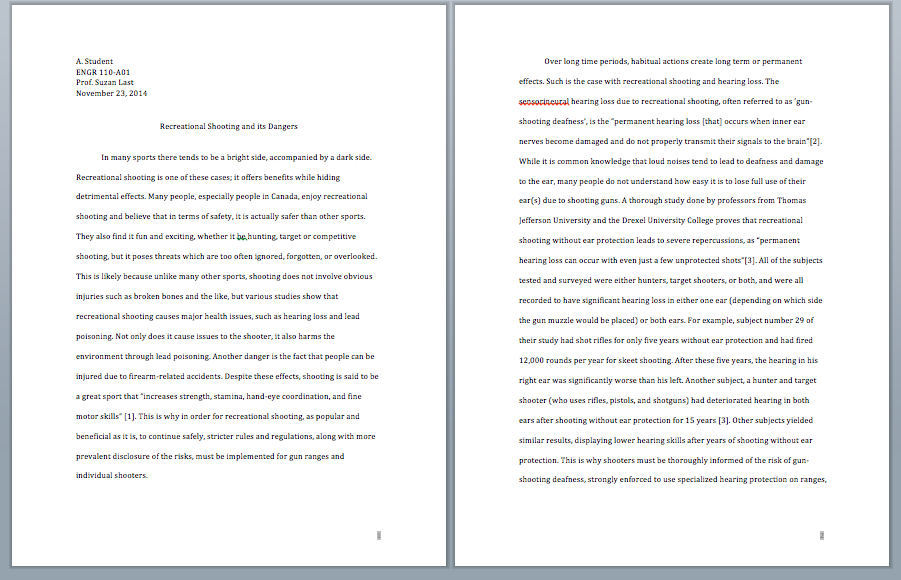
As a student writing an academic essay, you are typically expected to indent the first line of each paragraph and double space the body text. Why is this? Well, double spacing is a convention that arises from the need for your instructor to add feedback directly on the page. And indenting the first line of each paragraph means you don’t have to quadruple space to indicate a new paragraph.
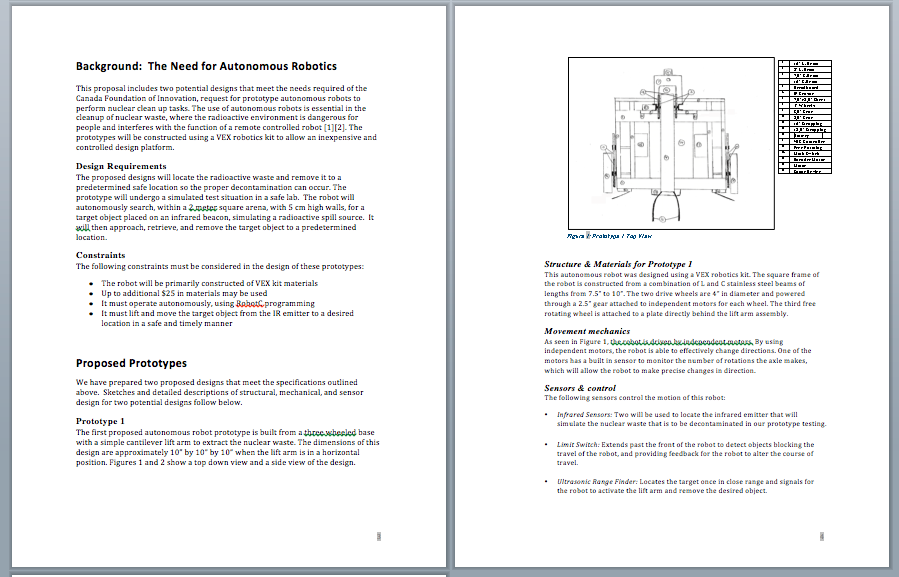
Technical writing also uses formatting conventions strategically to ease the process of reading information that may be highly complex and technical, and perhaps not overly interesting to the reader. However, these conventions differ somewhat from those you’ve learned to use in your academic writing. For example, body text is typically not double spaced, as the reader is not usually meant to provide detailed feedback (and to avoid scrolling fatigue). A draft given to colleagues for feedback may be double spaced, but the final version is generally single spaced. To break up “walls of text,” the format makes extensive use of headings, lists, figures and tables to help convey information in an efficient and reader-friendly manner.
EXERCISE 3.1 – List some conventions of academic formatting
Examine the formatting in Figure 3.1.1 below and list some of characteristics that adhere to academic writing format requirements that you are familiar with. It does not matter if you cannot read the text; simply examine the formatting.
Now examine the document in Figure 3.1.2. What differences do you notice? List some of the features that differ from the academic writing sample above. Consider why typical readers of technical writing would find these features desirable. Which document would you rather read? Why?
It is important for writers to understand the conventions of the genre in which they are writing. Conventions are the “rules” or expectations that readers/viewers have for communicating in that particular genre or medium. If you do not follow the target audience’s expectations in this particular type of situation or context, you run the risk of confusing them—or worse, damaging your credibility by being seen as someone who is “out of their depth” and perhaps lacks understanding or expertise in this context. Document design is a kind of “visual rhetoric” in that the visual design of your information helps you to persuade the reader and present the information in a way that will have the desired impact. Making design choices that conform to the expectations of the genre and your audience will help your message have the impact you want it to have.
Style Guides and Templates
In many writing contexts, style guides and templates will be available to help you organize and format information according to expected conventions. Style guides dictate the general rules and guidelines that should be followed; templates offer specific content and formatting requirements for specific kinds of documents. Academic publishers make style guides available to prospective authors so that they know how to appropriately format documents they submit to that publication. Newspapers, academic journals, organizations, and businesses often have their own “in house” style that must be followed by all writers within that organization.
A company may have specific templates, for example, a Memo template, that all employees must follow, in order to ensure consistency of messaging within the organization. You likely had a style guide to help you format your bibliographies and term papers in many of your classes (e.g. APA or MLA Style Guides), and in Science classes, you likely had a template to help you organize Lab Reports. Your university or college likely has a “brand” or “style” guide that governs all institutional messaging.
Technical writing makes use of several typical design features to organize information efficiently and enhance readability. These include headings, lists, figures, and tables, as well as strategic use of passive space around all of these features. Consider the style requirements you are expected to follow in your course, in a particular assignment you are working on, or even in creating your own “graphics charter” or “company brand.” Could you create a Style Guide that provides the details other contributors will need to know? Use the template below to create your own Style Guide
Defining Your Style Guide
Since Microsoft Office products (Word, Excel, and PowerPoint) are industry standard, your Style Guide might indicate how your formatting adheres to and diverges from the defaults in Word. Include details about the following document design elements:
TYPOGRAPHY: What font sizes and styles will you use? Specify fonts for headings (at each level), for body text, captions, table text, and any other elements you might use (like pull quotes or text boxes). You might also provide visual examples of each type of text.
MARGINS and SPACING: How much space will you leave on each margin (left, right, top and bottom of page)? Will you single space your body text? double space? something in between? Will you left align all text, or will you indent the first lines of paragraphs? Will you fully justify paragraphs, or leave a “ragged” right margin? Do you have a guideline for minimum or maximum length of paragraphs?
COLOUR: What colours will you use consistently in your document? How? Ensure colour schemes are consistent with your thematic message, and that colour contrasts are effective and accessible.
VISUALS: will you design a logo? a recurring graphic element in the header or footer? How will you deal with embedded visual elements like figures and tables? Is there a specific design you will use for tables (e.g. colour of header row should be consistent with your colour palette). Will figures be left aligned? centred? Will you wrap text around figures or not?
The rest of this chapter offers specific and detailed information on how and why technical writers use the following design features:
- Headings: headings and subheadings provide a clearly visible organization and structural cues that allow readers to understand the structure, preview information, and read selectively.
- Lists: lists provide a way to concisely and efficiently convey information and emphasize ideas. There are several kinds of lists, each used for specific purposes.
- Figures and Tables: visual representations of data and concepts offer a reader a break from sentence and paragraphs, and provide additional ways to illustrate and understand information.
- Passive Space: leaving blank space (also called “passive” or “negative” space) strategically on the page (around lists, figures, and headings, and between paragraphs) helps the reader to absorb the information in the “active” space more effectively, and helps create a visually appealing look.
- Visual Rhetoric: Using visual design to help enhance the persuasive appeal of your document.