Additional Accessibility Guides
Use AI to Enhance Accessibility
According to ChatGPT, artificial intelligence is an exciting development that has the potential to significantly improve digital accessibility for disabled people by describing visual content, automatically generating captions and transcripts, assisting writing, aiding understanding, and converting between formats. When designed thoughtfully and inclusively, AI tools can reduce barriers, increase independence, and expand equitable access to information, education, and communication in digital spaces (“Positive impact of AI“).
“AI itself is expanding the concept of assistive technology, shifting from traditional tools to intelligent systems capable of learning and adapting to individual needs. This evolution represents a fundamental change in assistive technology, emphasizing dynamic, adaptive systems over static solutions.”
Learning about AI is essential for everyone. Thinking critically about the (lack of) ethics, (devestating) environmental impacts, constant copyright infrignements, and (financial) sustainability of AI may be key to the survival of humanity. But, AI is not all bad, I promise.
Being here (wherever here is) is important. But, learning must lead to doing.
“you end up doing the document rather than doing the doing”
We know AI is discriminatory against disabled people. Generative AI and AI chatbots (AI) can be uniquely helpful in improving the accessibility of digital content. AI has shown significant promise with:
- Describing visual content
- Transcribing audio to text
- Assisting with writing
- Aiding understanding
- Converting digital content
There is no guarantee that AI will create accessible and inclusive content. However, harnessing AI to assist with accessible content creation and remediation can assist humans to create more inclusive content and experiences.
“Too much action without reflection is mere activism; too much reflection without action is mere introspection and armchair discussion”
(Beck 134)
Understanding AI’s limitations and capabilities is important. However, to make a tangible different, something must be done.
It’s time for doing.
Describing Visual Content
AI has shown to be particularly adept at describing visual content. Consider tools such as Alt Text Assistant in ChatGPT, Image Accessibility Creator, or use a detailed prompt in most AI interfaces.
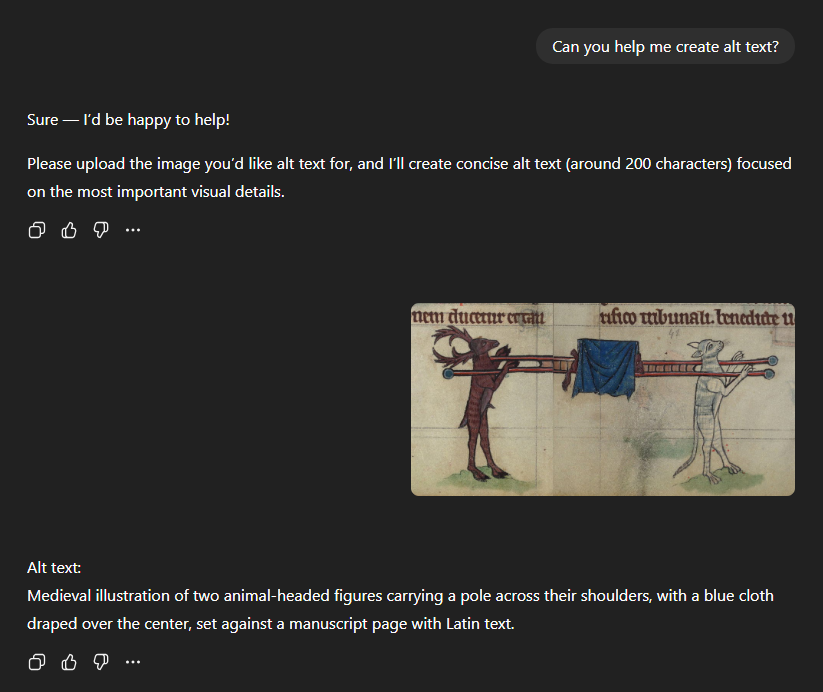
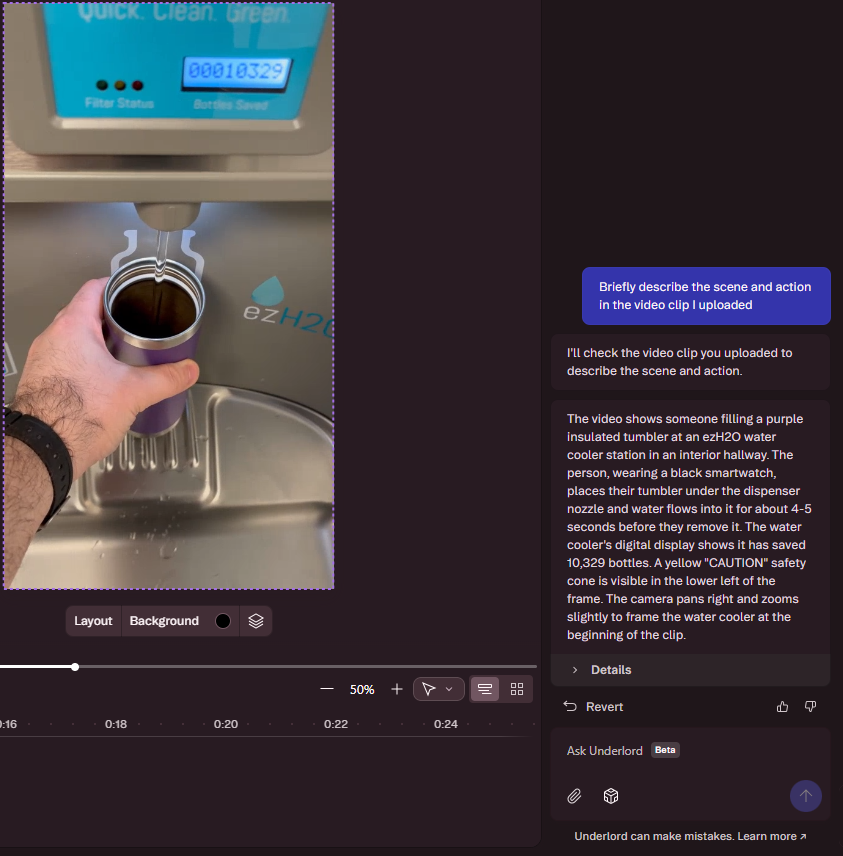
The description may not be 100%, but using AI to start the process of writing alt text goes a long way to create accessible and inclusive digital experiences. After generating draft alt text with AI, verify the accuracy, edit hallucinated details, and ensure the description reflects the intent of the use of the image.
Additionally, consider the impact of apps like Be My AI and Seeing AI that assist Blind and low vision users in real time to identify objects, read text, and engage with the environment.
For video, tools like DCMP’s AI Scene Description Tool and Descript’s Describe Video tool (pictured right) offer a glimpse into the promise of real-time frame-by-frame audio description of video content.
They say a picture is worth a thousand words. Well, let AI write some of those words for you.
Find a complex image you aren’t quite sure how to write alt text for and use one of the tools listed above. It might not be perfect, but AI can get you started.
Transcribing Audio to Text
The massive expansion of large language models powering AI has led to significant improvements in the accuracy of automatic speech recognition (ASR). ASR is what generates automated captions such as those generated in Zoom and Teams meetings as well as by video hosting services such as YouTube, OneDrive, and Kaltura. Factor in the rapid advancements in accuracy, while remaining aware that ASR does not yet meet the 99% accuracy required for accessible closed captions.
Writing Assistance
If you’re an educator, you are likely extremely wary of AI’s impact on academic integrity.
I hear you. I see you. I understand you.
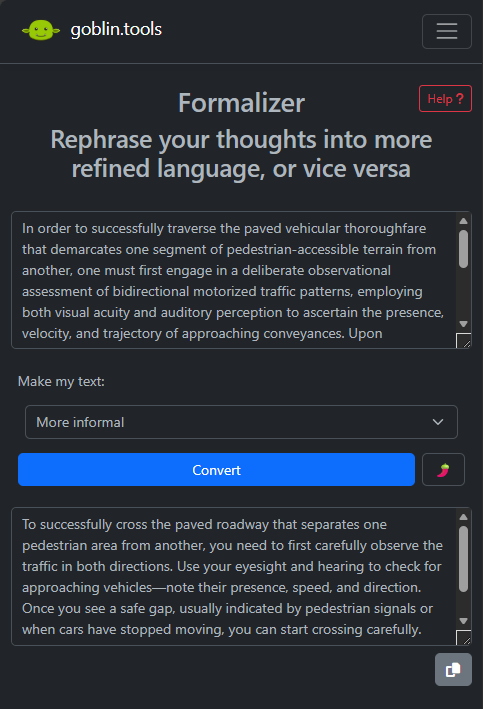
But let’s not think about the worst-case scenario. Consider goblin.tools Formalizer which takes existing text and re-writes it to be more professional, less snarky, more to the point, and many other tones.
Understanding Complex Text
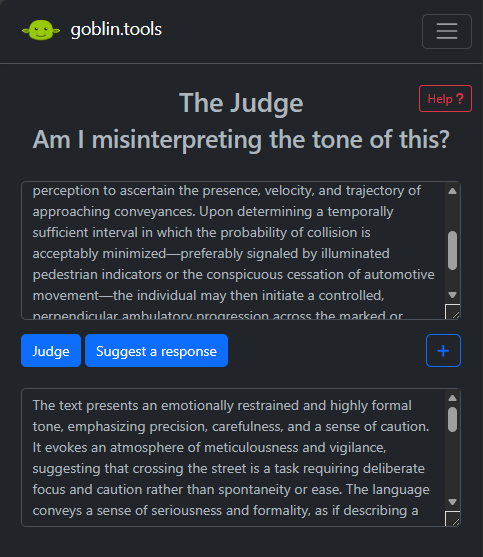
Regardless of access means or disability, it can often be difficult to determine the tone of written text, especially communications. Try out goblin.tools The Judge to get an explanation of what the tone and meaning of a message might be.
For easy-to-read versions of long, complicated text consider QuilBot’s Paraphrasing Tool. Another useful tool is to prompt to AI to explain something to you like you are 10 years old.
Converting file formats
AI can take a text prompt and generate a slop image or short video. That’s bad.
Another thing AI can do is convert images of text to machine readable text. This optical character recognition (OCR) process has been available in Adobe Acrobat or ABBYY FineReader for a long time. But now, an uploaded document accompanied by a straightforward “extract the text from this uploaded document” prompt works with most AI chatbots (according to a colleague, CoPilot did a better job of extracting handwriting from a scan than Acrobat Pro). Keep in mind, automated OCR struggles with columns, tables, maths, figure captions, and decorative elements, so human review remains essential.
What now?
Pick one tool and apply it to a project tomorrow. Or better yet, reach out to someone that might benefit from using one of theses and help them get started with it. What little thing can you do to improve the lives of your users?
Ok, do it.
Is it that easy? No
But is it really that hard?
“the principal concern of the modern American liberal is, at all times, not what one does or believes or supports or opposes, but what one is seen to be.”
Is there dissonance between your intentions today and your actions tomorrow?
dissonance, n.
“inconsistency between the beliefs one holds or between one’s actions and one’s beliefs”
Has AI discriminated, stolen, excluded, wreaked havoc on the economy, and accelerated human extinction? Almost certainly.
But AI also offers real, immediate opportunities to easily reduce accessibility barriers and make tangible, positive change in people’s lives.
But we have to get to the doing.